 |
Smith Brothers Services, LLC |
 |
||||
| PLOW PARTS |
|
FABRICATION |
|
|||
|
|
Smith Brothers Services, LLC |
|
||||
| PLOW PARTS |
|
FABRICATION |
|
|||
Updated 8-13-18
Meyer Standard Operating System Information - Page 3
Now that I have assembled and installed two more of the SOS plows, I found some little "quirks". These happen to be Drive Pro SOS plows, both using the 09498 DPE-7.5' Moldboards with 41090 Black Iron Crates.
The first one is that IF the plow is not connected, the controller will not turn on. This is because with the SOS the controller grounds through the plow itself. The second one is that even after turning off the controller, the plow lights will stay on until the ignition is turned off. I am sure this is a safety feature so that you can't turn the plow lights off while driving. The third one, well this brings back memories of the old Jack Leg used on the Drive Pro in the beginning. With the Jack Leg, there was a lever you would push down, and the Jack Leg would drop down to support the plow. The problem was geometry, when you backed the vehicle away, the plow Lift Frame would lean back making it impossible for one person to then mount the plow next time because when the plow Lift Frame leaned back, it moved the back end that engages the Clevis on the vehicle down a few inches. WE were the first ones to adapt a Crankstand like the MDII and EZ Plus to eliminate the Jack Leg, and the mounting problem back in 2011. Meyer followed suit after we sent pictures and explained how it corrected the problem. Fast forward to the SOS....

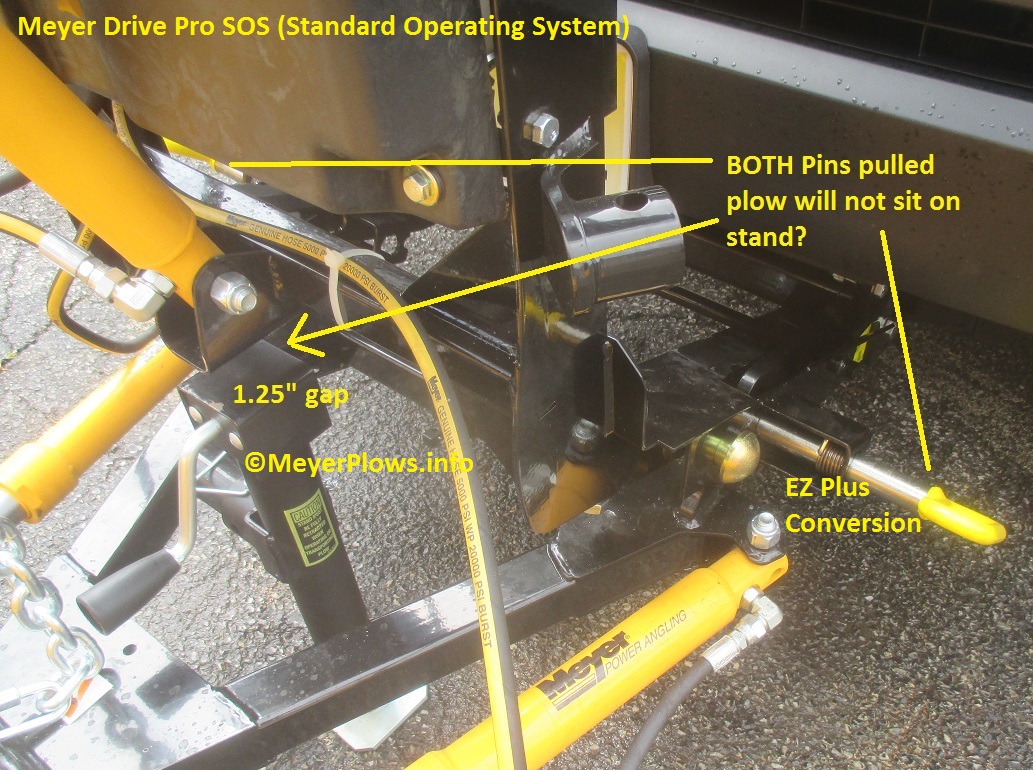
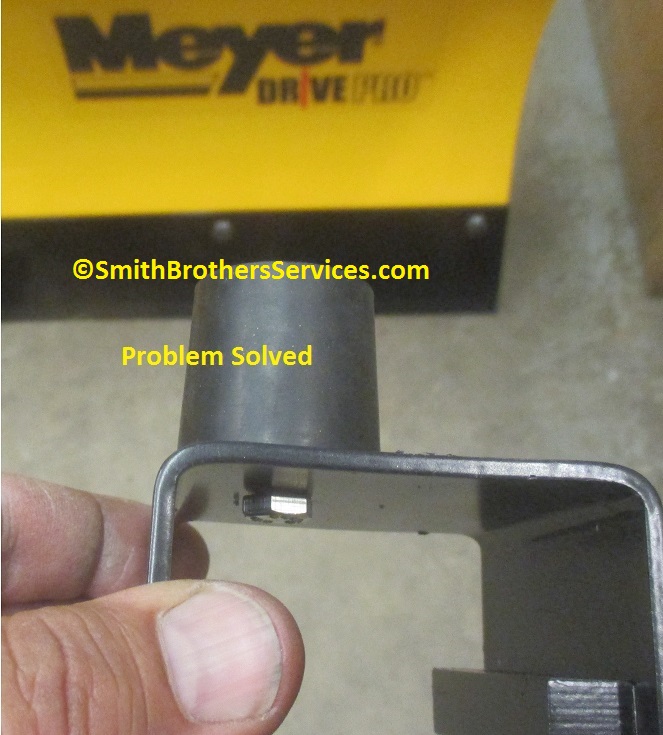
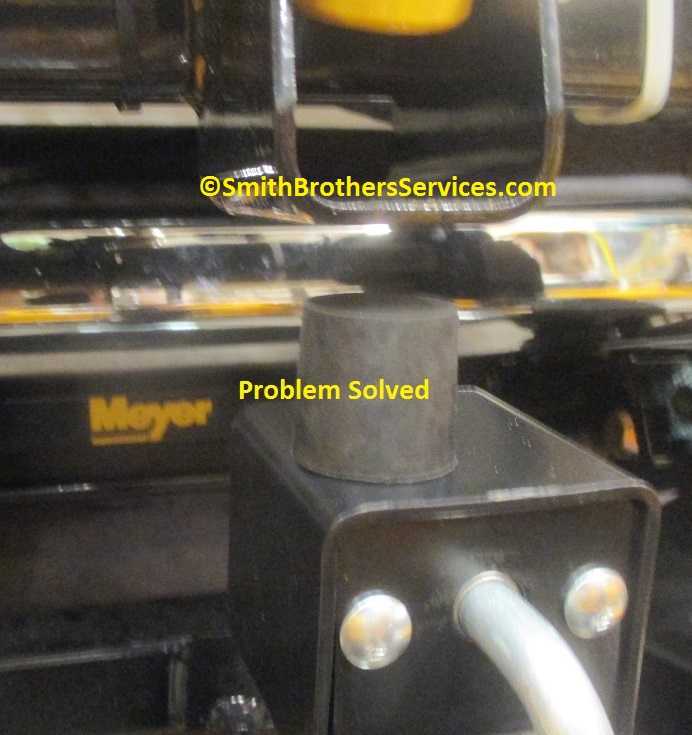
Because the geometry once again has changed by moving the A Frame mounting points (Pins) further forward on the Lift Frame, when you pull the pins, the Lift Frame hangs in mid-air, it does not drop down onto the top of the Crankstand. As soon as you back the vehicle away, it slams down onto the top of the Crankstand, and then you have the same problem ala Jack Leg, the back of the Lift Frame where it engages the Clevis on the vehicle is now too high, making it difficult to get it mounted on the vehicle. You would have to lower the Crankstand, but this may present a problem with the Single Pull bar hitting the Clevis when trying to mount the plow. Because I cannot STAND the Single Pull, about 85% of the Meyer Drive Pro installs I do I convert to EZ Plus to eliminate the bar troubles. The EZ Plus conversion does nothing to help the geometry problem, but I found a solution that has worked on the two Meyer SOS Drive Pro plows I have installed so far. A simple rubber snubber mounted on top of the Crankstand.
 SKU: SBS-snubber
Then we have another problem due to the design changes in the SOS versus the original Drive Pro. The original Drive Pro had a hole in the Pivot Pin Sleeve on the back of the Moldboard so you could use a rubber tip on a grease gun, and grease the pins. It was not easy, but it was possible. We offered (and still do) a solution, which was to replace the Pivot Pins with Pivot Bolts originally used on the TM Series plows, with a grease fitting on the heads of the bolts. This makes it VERY easy to grease the pivots. Once again it is the TM Series to the rescue. The TM King Bolt can be used to replace the Meyere Drive Pro SOS Pivot Pins, allowing you to grease the pivots. The TM Pivot Bolts are too long. As you can see, Meyer did not change the design of the Pivot Pins, so they are WAY too long in my opinion for the new design. You can simply install the TM King Bolt and be done with it. It works on both the Drive Pro 6' 8" and the Drive Pro 7' 6". A special Lock Nut is required.

 SKU: M13591
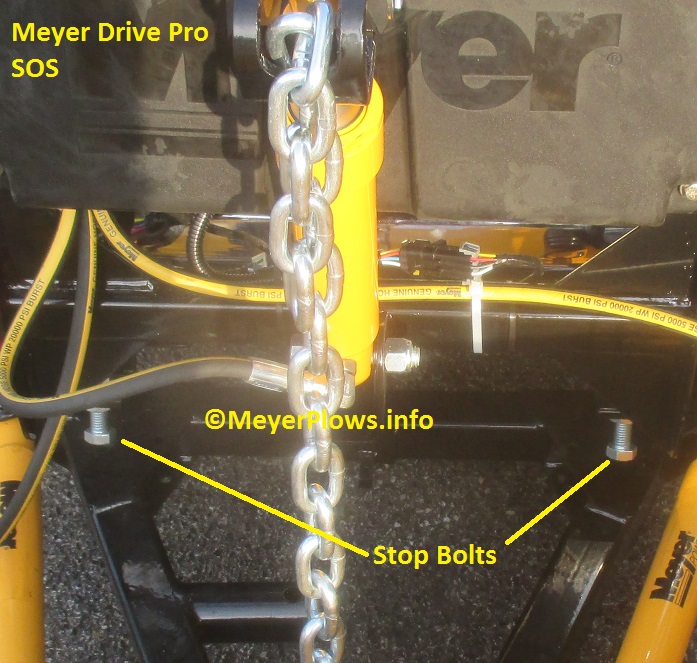
By design, the SOS (ALL of them) is the first plow where it is possible for the Lift Arm to hit the back of the Moldboard. Stop Bolt adjustment is critical (see pic below). The last plow that it was possible for the Lift Arm to hit the back of the Moldboard was the Xpress Plow. The fix was to start out with the Lift Arm level, AND you were supposed to lift the plow as you come into the pile at the end of a push. Now we can argue why it is a good idea, and why it is not all day long. All I can say is in the past, you always allowed the plow to ride up the pile on its own. It is not a dozer or a loader, and the hydraulic system is NOT powerful enough to "lift" snow like a loader. Trying to do so would just put the pump into relief, which served no purpose other than adding load to the battery when it was pointless to do so. Much like trying to angle the plow with a full load of snow in front of the blade, there is not enough power to do it. Now in the past, WE have used the back hole in the Lift Arm for the Drive Pro so it would lift faster, and higher. With the new design, the geometry has changed, and it is not necessary to use the back hole (in fact you cannot use it) anymore. The plow lifts more than high enough using the front hole. One of the problems we have seen in the past when trying to lift the snow as you go into the pile was the Lift Cylinder would load up with the pump pressure (be it 1650psi for the E-47, 2000psi for the E-57/58, and 2500psi for the E-60) it would load up with that pressure because it could not lift. At the point where the plow would naturally ride up the pile, especially if a "cowboy" was behind the wheel, and came in fast, the plow would jump up, and the Lift Ram would shoot out of the hydraulic unit, and crack the Top Cap. This was (and still is) more common with the E-60 because it runs at such a high pressure. So we drifted off topic a little, but the gist is you cannot use the back hole in the Lift Arm, and as you come into the pile, tap the up button so the Lift Arm is moved up and cannot hit the back of the Moldboard.
Another change that is not a big deal though it looks cheesy is that they went to a "quick link" on the Lift Chain. This is because they wanted to use the galvanized chain like the Lot Pro, except that they used to weld the chain onto the Drive Pro A Frame. On the Lot Pro, the chains are attached to the A Frame with U Bolts. This allowed them to use the galvanized chains. The problem is that it is almost impossible to ensure good coverage when attempting to powdercoat a chain. I am assuming the quick link is cheaper than a U Bolt, so they went that route instead. The Moldboard, Pivot Bar, and A Frame are not that heavy, (less than 200 pounds combined) so the quick link is more than strong enough for its intended use, it just looks cheesy.

We decided to offer an upgrade kit for the Meyer Drive Pro SOS. What does it include?
Well it will be easier to explain each part of the kit, and what it replaces that comes standard on the Meyer Drive Pro SOS. It is all listed above, but here is a list with more pictures explaining the kit.
Includes:
(4) Stainless Steel Bolts and (4) Stainless Steel Washers to replace (4) Grade 2 mild steel bolts holding plastic front Cover on (which will leave rust streaks on cover).
(1) Rubber Snubber w/hardware for top of Crankstand (prevents Lift Frame from hanging in mid-air and from dropping as you back away during dismount).
(2) TM King Bolts w/Special Lock Nuts to replace Pivot Pins (that are WAY too long).
(1) 3/16" Lynch Pin to replace Hairpin holding Lift Arm to Lift Frame (must drill existing 1/8" hole to 3/16").
(1) Bolt and Nylock Nut to replace Clevis Pin and Hairpin holding Lift Cylinder to Lift Arm (there is no reason to have a pin here)
Order your Meyer Drive Pro SOS Upgrade Kit here.
I hope you learned even more about the Meyer E-73 SOS. I will add more info as I come across it. Stay tuned!
Back to Page 1
Back to Page 2
Back to Page 4
Meyer Drive Pro Standard Operating System UPGRADES
____________________________________________________________________________________
|
|
Smith Brothers Services, LLC |
 |
| |
Entire site Copyright 2006 - 2018 Smith Brothers Services, LLC All Rights Reserved
Our Other Sites:
Snowplowing-Contractors.com
ChucksChevyTruckPages.com
SmithBrothersPlowParts.com
SmithBrothersServices.com
MeyerPlowHelp.com MeyerST.com
PlowPump.info
MeyerPlowPumpParts.com
Home-Plow-By-Meyer.com MeyerE-57.com
MeyerE-60.com
MeyerDrivePro.com
MeyerPlows.info MeyerLotPro.com
MeyerE-47.com
MeyerRoadPro.com
SmithBrothersTruckParts.com
MeyerE-58H.com MeyerPathPro.com
MeyerVPlow.com
MeyerE-72.comMeyerE-68.com
Smith
Brothers Services on
YouTube


